
-
CarryMap for Android
- About the app
- Application terminology
- Section 1. Getting started and configuring the app
- Section 2. Application data
- Section 3. Opening maps and creating projects
-
Section 4. Creating and editing features
- About GeoPackage
- Creating new features
- Creating features by coordinates
- Creating point feature by photo
- Creating points with single tap
- Recording track
- Selecting symbol when creating feature
- Adding attachments to feature
- Filling in fields using QR code
- Editing features
- Adding and viewing Z coordinates
-
Section 5. Additional functionality
- Track log
- Use as a destination point
- Searching features
- Measuring on the map
- Circular ruler
- Creating marks
- Creating bookmarks
- Save map extent
- Selecting map scale
- Finding current location
- Sharing location information
- Displaying information from GPS/GLONASS receiver in the map window
- Use external GPS receivers
Maps catalog
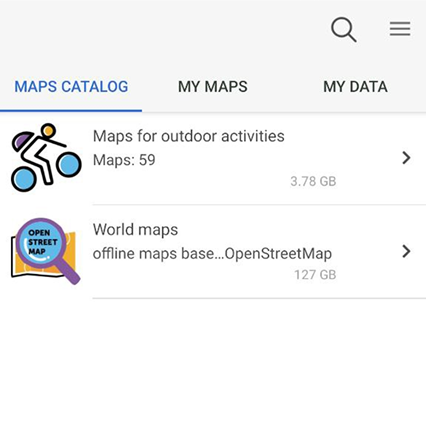
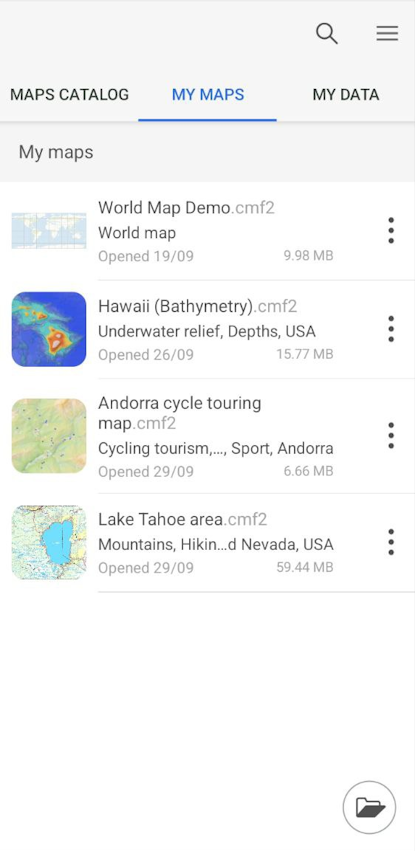
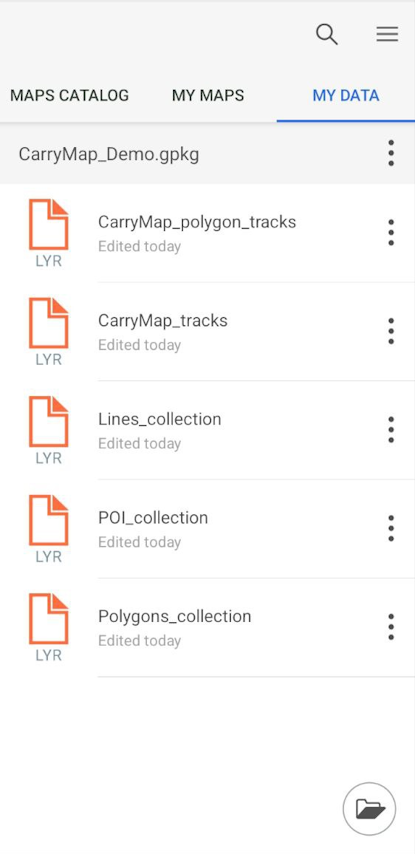
The start page of the CarryMap application consists of three sections: the Maps Catalog, My Maps and My Data .
The Maps catalog tab contains free maps in the CMF2 format of various thematic focus, available for download if there is an Internet connection.
|
To download a map from
Maps catalog
, select it from the list and tap
Download
 . The download process will start.
To cancel the process, tap
Cancel
 .
.
If the map has available updates, you will see the icon
 near this map name. Tap this icon to download the updated version of the map.
NOTE: Downloading maps, might be charged for using Internet traffic due to your provider tariff.
The My Maps tab displays all maps in the CMF2 and MBTILES formats downloaded and added by the user and stored on the device in the applications folder, as well as projects created from the application data (see Creating and opening project ). Access to the data in the My Maps section does not require an Internet connection.
|
The My data tab displays data in GeoPackage, KML/KMZ, GPX, SHP formats stored on the device in the application folder. Access to the data in the My data section does not require an Internet connection.
|