
-
CarryMap Builder
- About CarryMap Builder
- Installing CarryMap Builder
- Licensing
- Registering CarryMap Builder license
- Creating mobile map from ArcMap project
- Managing identification templates
- Extracting map by selected polygon layer
- Merging multiple CMF2 maps
- Converting CMF to CMF2
- Generating map reports
- Importing and exporting data in GeoPackage format
- Geoprocessing tools
- Setting CarryMap Builder
- Support
Extract map
he Extract map geoprocessing tool is provided to extract ArcMap map documents to CMF2 format.
|
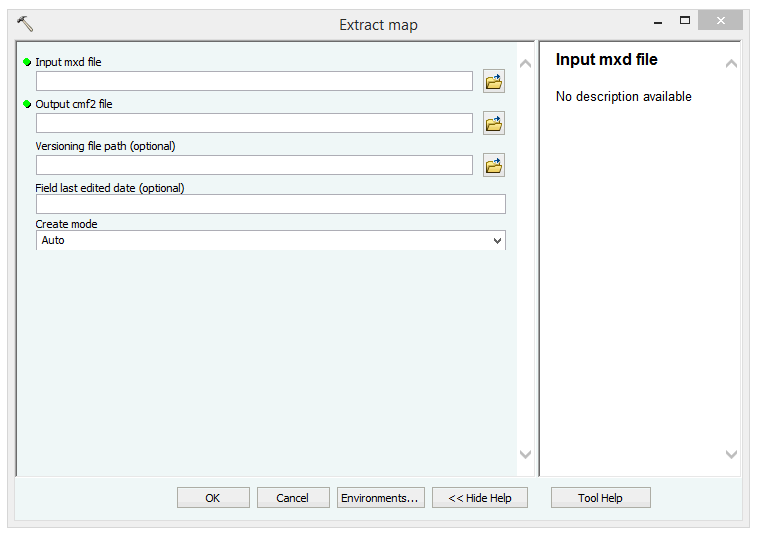
To start extraction, specify the following parameters:
- Input mxd file - name of the input mxd file.
- Output CMF2 file - name and location of the output CMF2 file.
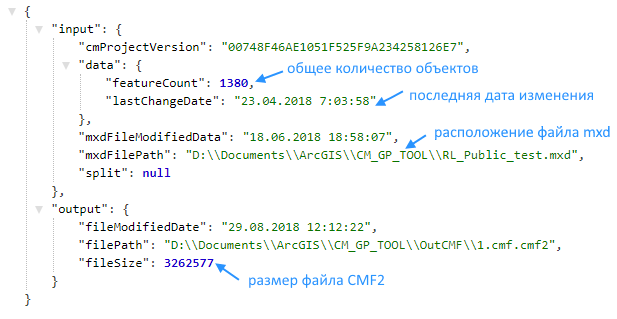
- Versioning file path - name and location of the output json file.
|
- Field last editing - name of the field to record the change date of the output CMF2 file (the default name is Edit tracking).
- Create mode - mode of the CMF2 files creation.
After specifying all parameters press OK .
Note that geoprocessing tools are available for users with Corporate or Global CarryMap Builder license only.